Customer Experience Design: Principles, Frameworks & Examples
Table of Contents▼
- What Is Customer Experience Design?
- Core Principles of Customer Experience Design
- Customer Experience Design Frameworks
- How to Design a Customer Experience
- Customer Experience Design Examples
- Designing for Consistency Across Locations
- Tools for Customer Experience Design
- Frequently Asked Questions
- Conclusion
All businesses want their customers to have a great experience with their brand. But did you know you can intentionally design this journey using key principles and strategies? That’s CX design.
Learn how to leverage the power of CX design, short for customer experience design. This article will teach you about:
- The core principles of customer experience design
- Customer experience design frameworks
- How to create a CX design, step by step
You’ll get examples you can apply to your own company, including how to use CX design for multiple locations. And you’ll learn about tools that make CX design easier, like automated feedback collection and analysis.
What Is Customer Experience Design?
Customer experience design is the process of building a path for your customers to interact with your business brand. But it’s not just any path. It’s a journey that engages customers as they move through any point of interaction with your company.
You want these customers to have a great experience from start to finish. So, you design your website to achieve that. Customer experience design also includes how you create advertising campaigns. And another vital component is how you set up customer service responses.
CX design vs. UX design vs. service design
While customer experience design (aka CX design) signs like UX design, there are differences between them. Similarly, CX design is not the same thing as service design.
User experience, or UX, design is more of a physical, technical subcategory of customer experience. It determines how customers interact with your platforms, like navigating your website.
Service design is how you arrange people, processes, and tools to enhance the customer experience. It’s also a component of customer experience design.
Why design (not luck) drives great CX
Luck is not a strategy or a plan. Things could go your way for customers…or they could have a terrible experience. Then they turn to a competitor that offers a better experience.
It’s like waiting for customers to find you instead of proactively seeking out leads. You increase the odds of success much more with intentional action.
Consumers today feel overwhelmed by both choice and technology. So they’re looking for experiences that lighten that load.
Recent surveys show that 74% of consumers will walk away from a purchase decision if they feel it’s just too much work. But if you set up the customer experience right using thoughtful design, you can prevent that. Instead of feeling overwhelmed, your customers will feel empowered.
Core Principles of Customer Experience Design
CX design is built around a set of core principles. When you master these, you set up customers for a positive experience.
Customer-centricity
You probably see ads every day for companies touting their values or statistics. But where is the customer in all that? Where is the focus on their pain points and solving their problems?
In contrast, customer experience design must be centered around the customer. It sounds obvious, but in practice, many companies forget this.
It doesn’t matter what you want if it’s not making the customer feel good about their interaction with the brand. You can have the coolest, most high-tech website. But if the customer struggles to use it—or if it feels impersonal—they may bail.
Consistency across touchpoints
Touchpoints are all the different places where customers interact with your business. You want to make those interactions consistent in multiple ways:
- Visually (logo, graphics, color palette, etc.)
- Verbally (consistent language and terminology)
- Technically (straightforward, user-friendly)
- Emotionally (feel good across the journey)
We’ll talk more in the next section about how to map the customer journey to cover these touchpoints.
Emotion & effort
Above, we mentioned the importance of considering customer pain points. This plays into infusing the customer experience with emotion.
Remember that nearly all consumer decisions are emotionally driven underneath. How can you find the key emotions that unlock your customers’ choices?
You need to make the experience as frictionless as possible too. That involves effort to understand the customer journey. Try to remove hurdles and depersonalization that might make them lose interest.
Feedback-driven iteration
What is feedback in business? It’s an ongoing cycle of gathering information. However, it’s not enough to collect data and sit on it. You need to apply it for it to be worthwhile.
In designing your customer’s experience, you should use feedback to drive changes to their journey. It’s not a static one-and-done with your website, for instance. If something’s not working, you change it. You then continue to monitor feedback to see if the changes were successful with each iteration.
RELATED ARTICLE — Voice of the Customer
Customer Experience Design Frameworks
A customer experience framework is a blueprint used to plan an optimum experience. It breaks down various touchpoints and maps them out. This lets you see every place where you have influence over the customer experience.
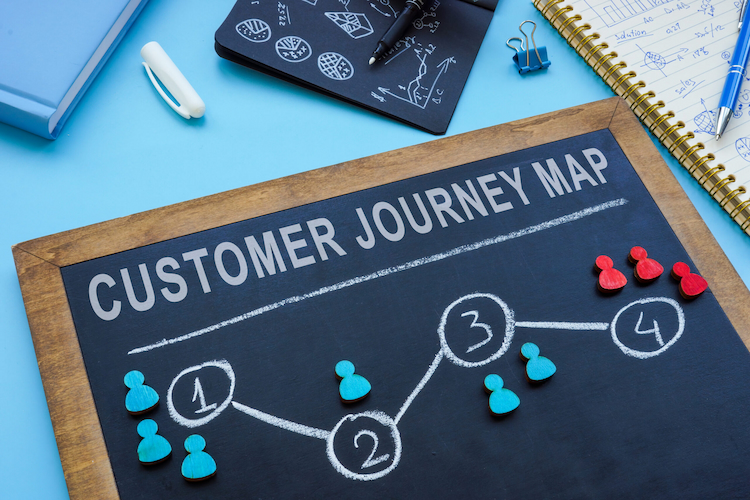
Journey mapping
Journey mapping is the process of figuring out the path customers take under different scenarios. The goal is to find sticking points where churn may occur. You also look for gaps where service is lacking, so you can fill in those spots with staff or self-serve options.
Service blueprinting
A blueprint for a house is a map that shows all the structural elements, wiring, and plumbing. Likewise, your service blueprint maps behind-the-scenes elements. These are all required for the desired customer experience. What teams, actions, and processes are needed to deliver what you want?
Jobs-to-be-done
This is where you prepare to implement the customer experience plan you want. Usually, it involves assigning teams from different areas like these to collaborate:
- Advertising
- Marketing
- Sales
- Customer service
- IT/engineering
Cross-departmental work on your CX design makes it more seamless for the customer. Otherwise, you can wind up with gaps between elements where the ball gets dropped.
How to Design a Customer Experience
Using the concepts above, let’s walk through how to design a customer experience. It can feel daunting, but designing a customer experience is doable when you take it step by step.
Research & map the journey
Creating a superior customer experience starts with mapping the customer journey. This involves a fair amount of research. And you need to be aware that the journey may vary for different customers.
It helps if you first create personas for your customers—hypothetical profiles of your most common customer types. It’s easier to understand their path when you know what they’re looking for.
Identify moments that matter
As you map the customer journey, you’ll find key times when the experience can go well or go south. Some examples include:
- Deciding to go with your company over a competitor
- Signing up for a subscription or future emails
- Checking out to purchase a service or merchandise
- Reaching out to customer service or tech support
- Upgrading or downgrading a membership tier
- Scheduling an appointment at a physical location
- Paying an invoice or setting up a recurring payment
These are all vital touchpoints where your experience design can alter everything.
Prototype, test & roll out
Once you’ve done your research, you create a customer experience map, as described earlier. Is this the final version? No, it’s likely a prototype.
If you did the first part of the design right, most of it will be right. But there will be bits that need tweaking. That’s why it’s smart to test it first. Then you can roll it out to a broader audience.
RELATED ARTICLE — How to Build a Customer Experience Management Strategy
Customer Experience Design Examples
Let’s look at a couple of hypothetical scenarios for customer experience design. These can help you see where to make improvements with your own CX design.
Multi-location/franchise examples
Remember when we said consistency across all touchpoints is a key part of CX design? This is extra challenging when your business has multiple locations or franchises.
What are some things you might look for in this situation?
- Do visuals and graphics show consistency across all locations? Are you using the same logo and color palette?
- Is training handled the same way for all employees? Or is it up to the different locations to provide staff education?
- Are locations each using their own software for functions like purchases, login, and communication? Or is that all controlled by one central IT department?
Before-and-after touchpoint redesign
Here are some examples of how those potential pain points above manifested and how they were fixed using CX design:
- Some customers didn’t know franchises were part of the same fitness chain. So you improve visual consistency with signage. It lets them know they could use their memberships in multiple locations.
- Customers complain about messiness from one location of a plumbing chain. That branch is retrained on how to clean up after a job so reviews don’t bring down the entire enterprise.
- Users of an online wellness service mention they can’t sign in at physical locations. But this should be included with their membership. In response, software at brick-and-mortar yoga studios was retooled for easier sign-in.
Designing for Consistency Across Locations
There are a couple more issues that multi-location companies run into. Some of these were touched on in the examples above.
Standards vs. local flexibility
Every business is unique. Only you can decide how strict you are about brand standards versus giving each location some autonomy.
But if you look at the hypothetical scenarios in the paragraphs above, you’ll notice similar concerns. When local independence starts to affect customer satisfaction, it’s time to impose more consistency.
This friction often shows up in these areas:
- Online services, like checkout or member login
- Employee training for physical locations
- Customer policies, such as returns or refunds
- Graphics and logos across different locations
- Quality of service or goods for customers
Pay attention to these touchpoints for customers when mapping their CX design. That way, you can be more proactive and prevent problems rather than simply reacting to them later.
Measuring consistency
How do you measure consistency in the customer experience across multiple locations?
You can use voice of the customer (VoC) metrics that standardize responses. They give you more objective data to drive changes to your CX design.
One example is the Net Promoter Score or NPS. It’s given to customer responses to surveys about their satisfaction with something. Typical options include answers like:
- Satisfied to very satisfied
- Somewhat satisfied or neutral
- Dissatisfied to very dissatisfied
Then those responses are given a number. You can tally up the numbers for various responses. This lets you see how many customers are satisfied versus how many are not. You can use location benchmarking to compare how different branches fare in the survey.
Other methods of measuring and improving consistency include:
- Conducting site audits at physical locations
- Collecting real-time feedback from customers
- Using centralized digital asset management (DAM)
- Collecting operational metrics, like wait times
- Comparing your benchmarks to industry standards
- Compose brand playbooks and training manuals
RELATED ARTICLE — How to Measure Customer Experience
Tools for Customer Experience Design
Luckily for businesses today, there are tools that can help with CX design. Automating parts of the process lets you focus on other areas that need a more human touch.
Journey-mapping & feedback tools
To review, mapping the customer’s journey is a major part of creating the best experience for them. Not sure where all their pain points are?
Try using feedback tools that collect reviews and social media comments as they are posted. You can also use customer feedback software to ask questions via surveys that yield Net Promoter Scores. Then the same tools analyze the data so you can use it constructively.
Closing the loop on design changes
Using what you learn in designing your CX experience is the most important part of the process. That’s the part that actually impacts the customer. Implementing changes based on feedback is known as closing the loop.
There are both inner and outer loops to be closed most of the time. Outer loops involve more sweeping changes that take time to close. One example would be updating your entire website to make navigation easier.
Inner loops are those that can be closed quickly, often through customer service. And they usually involve an individual or a small number of people. For instance, providing a month of free fitness club access to a disgruntled member would be closing an inner loop.
Closing outer loops entails continuously collecting data. Then you have to analyze it and decide what’s feasible to act on. You want ongoing data collection for inner loop closure too, using the same tools. But with the latter, you need features like real-time alerts so you can address issues before they result in customer churn.
Frequently Asked Questions
What is customer experience design?
Also known as CX design, customer experience design means creating the ideal journey for your customer with your company’s brand. It covers all touchpoints where they interact with the business. That includes online, in person, via advertising, and over the phone.
What are the principles of CX design?
There are four core principles of customer experience design:
- Customer centricity: Designing the experience focuses on the customer, not the business.
- Consistency across touchpoints: You want the customer experience to be equally good across all points of contact.
- Emotion and effort: Consider customer pain points, and work to reduce friction there.
- Feedback-driven iteration: Continue to solicit customer feedback and make changes as needed (not a static process).
What’s the difference between CX and UX design?
CX design is planning for the entire set of customer interactions with your company. UX design is a subset of this. It’s concerned with online and physical touchpoints, like your website or kiosks.
Conclusion
Are you primed to make improvements to your company’s CX design? Use these tips as you get started:
- Consider creating two customer maps. One is the regular customer journey. The other is an empathy map. The empathy map will reveal pain points if you’re looking for a good place to begin.
- Set up a triage system to catch and address voice-of-the-customer feedback ASAP. Be ready to implement cross-departmental collaboration to get out of the “silo” mentality. After all, your customers don’t interact with you in a silo, right?
- Prioritize function over style to empower customers. Think about elements like graphics, UX, and self-service options. But don’t rely exclusively on AI and chatbots. Know when a live human interaction is called for.
- Remember to continuously monitor feedback and tweak your design as you go. A feedback analytics platform makes this possible for businesses of nearly all sizes. And you’ll be better able to stay proactive about issues to close the loop earlier.